

Rechargeable disposable vapes have changed how people think about disposables in the UAE. Instead of throwing a device away after the battery dies, models like the WAKA soPro series let you recharge and keep going until the e-liquid runs out. But that only works well if you charge the device correctly.
This guide covers everything: the right charger to use, what each LED light colour means, how to know when charging is complete, what to do if your device won’t charge or doesn’t charge properly, how to extend battery lifespan, and the safety habits that keep both you and your device in good shape. Whether you’re new to rechargeable disposables or just troubleshooting a one-off issue, you’ll find a direct answer here.
At a Glance
| Feature | Details |
| Charging Port | USB Type-C |
| Charging Time | 30–45 minutes |
| Recommended Charger | 5V / 1A |
| Fast Charger | Not recommended |
| Full Battery | Green light |
| Medium Battery | Blue light |
| Low Battery | Red light |
| Empty Battery | Blinking red light |
What Type of Charger Does WAKA Use?
WAKA’s rechargeable disposables, including the WAKA soPro 10000, use a USB-C charging port — the same connector found on most modern Android phones — making it easy to find a compatible cable almost anywhere.
Recommended Charging Accessories
- A standard 5V / 1A USB charger
- A laptop’s USB port
- A portable power bank
- A regular phone wall adapter (non-fast-charging)
Chargers to Avoid
- High-wattage fast chargers
- MacBook chargers
- iPad fast chargers
These push more power than a small vape battery is built to handle, which can strain the internal circuitry over repeated charges.
Before You Start Charging: A Quick Checklist
- ✓ Use a USB-C cable
- ✓ Check the charging port for lint or debris
- ✓ Use a 5V/1A power source
- ✓ Place the device on a flat, stable surface
- ✓ Plan to unplug as soon as it’s fully charged
Step-by-Step: How to Charge a WAKA Disposable Vape
- Locate the USB-C port on the device.
- Connect a USB-C cable to a 5V/1A power source.
- Confirm the LED light turns on to show it’s charging.
- Let it charge for 30–45 minutes.
- Unplug once fully charged.
Never leave the vape charging overnight or unattended for long stretches.
How Do You Know When It’s Fully Charged?
Most WAKA rechargeable vapes stop charging automatically once the battery reaches capacity. Depending on the model, the LED typically shows solid green, stops blinking, or turns off. Once you see that signal, unplug the device rather than leaving it connected.
Can You Use a WAKA Vape While Charging?
Most rechargeable WAKA disposables are designed to be charged before use, not vaped while plugged in. Unless a specific model explicitly supports pass-through charging, it’s best to unplug before taking a puff — this avoids unnecessary strain on the battery and charging circuit.
Understanding WAKA Battery Indicator Lights
| Light Color | Battery Level | Meaning |
| Green | 70%–100% | Well charged |
| Blue | 30%–70% | Moderate charge |
| Red (steady) | Below 30% | Recharge soon |
| Red (blinking) | 0% | Fully discharged — charge before use |
How Long Does the Battery Last?
Battery life between charges depends on how often you puff, the device’s wattage, and the specific model. Lighter, occasional use stretches a charge further; frequent, longer puffs drain it faster. As a habit, it helps to recharge when the light turns red rather than waiting for it to die completely — this is easier on the battery in the long term and keeps you from being caught off guard.
Common WAKA Charging Problems & Fixes
Quick Troubleshooting Table
| Problem | Likely Cause | Solution |
| Won’t charge | Bad cable or power source | Try a new cable; test the charger on another device |
| Blinking red light | Battery fully empty | Recharge for 30–45 minutes |
| Burnt taste after charging | Coil still hot | Wait ~5 minutes before puffing |
| Light stays on after unplugging | Sensor affected by condensation | Gently blow into the charging port |
| Charging but not hitting | Empty e-liquid, coil issue, blocked airflow, or battery fault | See the section below |
Burnt Taste After Charging
The coil may still be warm right after a charging cycle. Wait about 5 minutes after unplugging before your first puff — this usually resolves it completely.
Light Stays On After Unplugging
This is often a sensor temporarily affected by condensation. Gently blow into the charging port to help clear any moisture.
No Charging Light at All
- Try a different USB-C cable.
- Check the port for lint and clean carefully with a wooden toothpick (avoid metal objects).
- Confirm your power source actually works by testing it with another device.
Why Is My WAKA Charging But Not Hitting?
If the device charges normally but doesn’t produce vapour, the cause is usually one of these:
- The e-liquid has run out
- A coil failure
- Blocked airflow
- A battery issue unrelated to charge level
- A stuck sensor
If basic troubleshooting (port cleaning, new cable, checking airflow) doesn’t resolve it, the device has likely reached the end of its usable life.
Signs Your Battery Is Wearing Out
- Takes noticeably longer to charge than before
- Drains much faster than it used to
- Never quite reaches a full charge
- Randomly shuts off during use
If you notice several of these together, the battery is likely degrading rather than facing a one-off issue.
Charging Mistakes to Avoid
Using fast chargers
Charging overnight
Using damaged or frayed cables
Charging in hot environments
Blocking ventilation around the device while it charges
Leaving the battery fully discharged for weeks at a time
Continuing to use a visibly damaged device
Good Practice vs. Bad Practice
| Good Practice | Bad Practice |
| USB-C, 5V/1A charger | MacBook or iPad fast charger |
| Unplug once full | Charge overnight |
| Keep the port clean | Ignore lint buildup |
| Let the coil cool first | Vape immediately after charging |
| Recharge before fully empty | Let the battery sit drained for weeks |
Battery Safety Tips
- Never puncture or disassemble the battery.
- Avoid exposing the device to direct sunlight or hot cars.
- Keep the device away from water and moisture.
- Stop using the vape immediately if it becomes swollen, unusually hot, or smells odd.
- Dispose of damaged or end-of-life devices responsibly, rather than in regular household trash.
Tips to Extend Your WAKA Battery Life
- Avoid overcharging — unplug as soon as it’s full.
- Use the correct charger (5V/1A, never fast chargers).
- Keep the charging port clean and free of lint.
- Store the device away from extreme heat or cold.
- Recharge before the battery is empty when possible.
Popular Rechargeable WAKA Devices

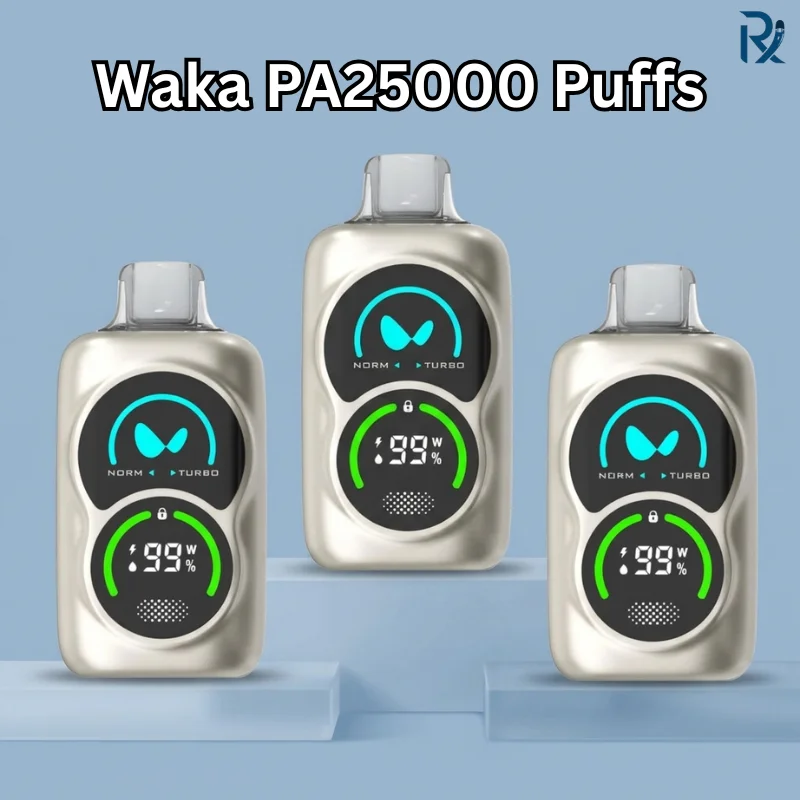
For longer battery life between charges, the WAKA PA25000 is a rechargeable disposable vape built for extended use. If fast USB-C charging and a clear battery indicator matter most to you, the WAKA soPro 10000 is a reliable rechargeable WAKA vape worth considering.
For more rechargeable disposable models, browse the full disposable vape collection.
Conclusion
Getting the most out of a rechargeable WAKA disposable comes down to a few consistent habits: use a proper 5V/1A USB-C charger, unplug as soon as the light shows full, keep the port clean, and avoid letting the battery sit fully drained for long periods. Pay attention to the LED colours — they’re designed to tell you exactly where you stand before you’re caught with a dead device.
Most charging problems trace back to a worn cable, a dirty port, or a charger that’s mismatched to the device — all fixable in a few minutes. If you’ve worked through the troubleshooting steps here and the issue persists, it’s a sign the device has reached the end of its lifespan rather than something you’re doing wrong.
For more rechargeable options and accessories, visit Authentic Vape in Dubai to explore the full range.
You can read the Common Waka Problems & Solutions guide and the Fake vs Authentic Waka guide to learn more.
FAQ
How long does it take to charge a WAKA vape?
Most WAKA rechargeable disposable vapes reach a full charge in approximately 30–45 minutes when using a standard 5V/1A USB-C charger.
What charger does WAKA use?
WAKA disposable vapes, including the WAKA soPro series, use a USB Type-C charging port and are designed to work with standard 5V/1A USB chargers.
Can I use my MacBook or iPad charger on my WAKA vape?
No. MacBook and iPad chargers deliver significantly more power than a vape’s small battery requires and should be avoided to reduce the risk of battery damage.
What does the green light mean on a WAKA vape?
A green light usually indicates the battery is between 70% and 100% charged and has plenty of power remaining.
What does the blue light mean on a WAKA vape?
A blue light generally indicates a moderate battery level, typically between 30% and 70%.
What does a red light mean on a WAKA vape?
A steady red light means the battery has dropped below 30% and should be recharged soon.
Why is my WAKA vape’s light blinking red?
A blinking red light usually means the battery is completely discharged. Recharge the device before using it again.
Why does my WAKA vape taste burnt right after charging?
This usually happens because the coil is still warm immediately after charging. Wait about 5 minutes after unplugging the device before taking your first puff.
Why won’t the light on my WAKA vape turn off after charging?
This can happen if condensation affects the internal sensor. Try gently blowing into the charging port to help clear any trapped moisture.
Why isn’t my WAKA vape charging at all?
Try using a different USB-C cable, check the charging port for lint or debris, clean it gently with a wooden toothpick, and make sure your power source is working properly.
Can I leave my WAKA vape charging overnight?
No. You should never leave your WAKA vape charging overnight or unattended for long periods.
Does using a fast charger damage a WAKA vape battery?
High-wattage fast chargers can place unnecessary strain on a vape’s small battery over time. A standard 5V/1A charger is the safest option.
How can I make my WAKA vape battery last longer?
Avoid overcharging, use the correct charger, keep the charging port clean, store the device away from extreme temperatures, and recharge it before the battery is completely depleted.
Is it normal for a WAKA vape to charge quickly?
Yes. A charging time of 30–45 minutes is normal for most rechargeable WAKA disposable vapes.
What should I do if cleaning the port doesn’t fix the charging issue?
If trying a new charging cable, cleaning the port, and testing another power source don’t solve the problem, the device may have reached the end of its usable lifespan.
Can I vape while my WAKA is charging?
Generally, no. Unless your specific WAKA model explicitly supports pass-through charging, unplug the device before using it.
How do I know my WAKA is fully charged?
The LED indicator will typically turn solid green, stop blinking, or switch off completely, depending on the model.
Why is my WAKA charging but not producing vapour?
This is usually caused by empty e-liquid, a coil problem, blocked airflow, or another battery-related issue that isn’t directly connected to charging.
How long should a WAKA battery last before it needs recharging?
Battery life depends on your usage habits and device wattage. As a general rule, recharge the battery when the red light appears instead of waiting until it is empty.
What are the signs that my WAKA battery is wearing out?
Common signs include longer charging times, faster battery drain, never reaching a full charge, or the device randomly shutting off during use.